ARandR: Another XRandR GUI
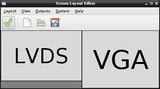
ARandR is designed to provide a simple visual front end for XRandR. Relative monitor positions are shown graphically and can be changed in a drag-and-drop way.
Features
- Full control over output positioning (instead of plain "left of") with edge snapping
- Saving configurations as executable shell scripts (configurations can be loaded without using this program)
- Configuration files can be edited to include additional payload (like xsetwacom commands tablet PC users need when rotating), which is preserved when editing
- Main widget separated from packaged application (to facilitate integration with existing solutions)
Installation
Using your distribution's installer:
From source:
Fetch either
the latest release:
wget http://christian.amsuess.com/tools/arandr/files/arandr-0.1.11.tar.gz
tar xzf arandr-0.1.11.tar.gz
cd arandr-0.1.11
or get it directly from GIT (hosted on GitLab):
git clone https://gitlab.com/arandr/arandr
cd arandr
and start it using:
./arandr
or install it:
sudo ./setup.py install
Bugs / Communication
- There exists a list of bugs (and feature requests and general wishlist). If there is a problem or you want to request a feature, just report it.
- New releases are announced as published tags and can be subscribed as an ATOM feed.
Ongoing development
An overhauled version of ARandR is in the works in the next branch found in the git repository. Feature parity with the current releases has not been reached, but some interesting features are already implemented:
- Parsing of the complete --verbose output, including properties
- Setting refresh rates
- Auto-discovery of DISPLAY in remote contexts
- Simulation and regression test infrastructure
Features targetted for the first release from the new branch:
- Setting properties
- Parsing EDID information
Similar projects
A number of other programs exist that cover similar functionality, often bundled with a particular desktop environment. Those I know of are, in alphabetical order:
- Gnome's gnome-control-center display, notable for its ~/.config/monitors.xml persistence
- grandr
- grandr-applet (which seems not to be related to grandr)
- KDE's RandR tool krandrtray, notable for being the only listed program to be Qt based
- LXDE's LXRandR, notable for storing configuration in ~/.config/autostart/lxrandr-autostart
- urandr
- zarfy, notable for its nice use of a current screenshot
Contributing
If you are fluent with languages not yet supported, you can add translations to ARandR using gettext. An easy way to do this is ARandR's page on hosted Weblate.
If you want to contribute code, contact me directly or send bug reports, suggestions, patches and git pull requests to the bugtracker.
If you want to support the project via flattr, you can flattr this.
About
Copyright © chrysn <chrysn@fsfe.org> 2008–2019, Себастьян Gli ţa Κατινα 2011, Johannes Holmberg <johannes@update.uu.se> 2015, actionless 2019 published under GPLv3 or any later version.
Inspired by the dual head sketch in the ThinkWiki.

Translations by
- Ajeje Brazorf (Sardinian)
- Alex Kalles, Dimitris Giouroukis, Efstathios Iosifidis (Modern Greek (1453-))
- Algimantas Margevičius, Mantas Kriaučiūnas, Moo (Lithuanian)
- Alireza Savand, reza khan (Persian)
- Allan Nordhøy (Norwegian Bokmål (Norway))
- Anders Jonsson, Erik Sundin, Ingemar Karlsson (Swedish)
- Bakr Al-Tamimi, Mohammad Alhargan, aboodilankaboot (Arabic)
- Balázs Úr, Tamás Nagy (Hungarian)
- Belvar, tornoz (Breton)
- Bruno_Patri, Clément Démoulins, Tuux (French)
- Calin Sopterean, Себастьян Gli ţa Κατινα (Romanian)
- Carezero, ChuChangMing (Chinese (China))
- DARREN MELROY MENEZES, gundachandru (Kannada)
- Denis Jukni (Albanian)
- Fred Maranhão, Guilherme Souza Silva, Phantom X (Portuguese (Brazil))
- Fuxik Nah, Slavko (Slovak)
- HsH, Ivan Vantu5z, Vladimir (Russian)
- Igor, Olexandr Nesterenko, Rax Garfield (Ukrainian)
- Joe Hansen, Sebastian Wahl (Danish)
- Kristjan Räts (Estonian)
- Louies (Chinese (Hant))
- Lu Ca (Portuguese (Brazil), Sardinian)
- Luca Vetturi, Quizzlo (Italian)
- Luis García Sevillano, Ricardo A. Hermosilla Carrillo (Spanish)
- Mehmet Gülmen, cem guresci (Turkish)
- Michal Čihař (Czech)
- Miguel A. Bouzada (Galician)
- Miguel Anxo Bouzada (Galician, Spanish)
- Nobuhiro Iwamatsu, o-157 (Japanese)
- ParkJS, cho bkwon, pCsOrI (Korean (Korea, Republic of))
- Piotr Strebski, RooTer, agilob (Polish)
- Rasti K5 (Sorani)
- Semsudin Abdic (Bosnian)
- Slobodan Simić (Serbian)
- Yaron Shahrabani (Hebrew)
- chrysn (English, German)
- ditokp (Indonesian)
- ekeimaja (Finnish)
- el_libre, josep constanti (Catalan)
- ikmaak, wimfeijen (Dutch)